Introduction
Bryntum components are data-driven by design—data is not just an enhancement, it is a core requirement. Whether you're rendering a Scheduler, Gantt chart, or Grid, each component depends on well-structured data to function correctly.
This guide serves as an introduction to Bryntum’s data management concepts, helping you understand the underlying data structures, loading mechanisms, and integration strategies needed to build functional and efficient applications.
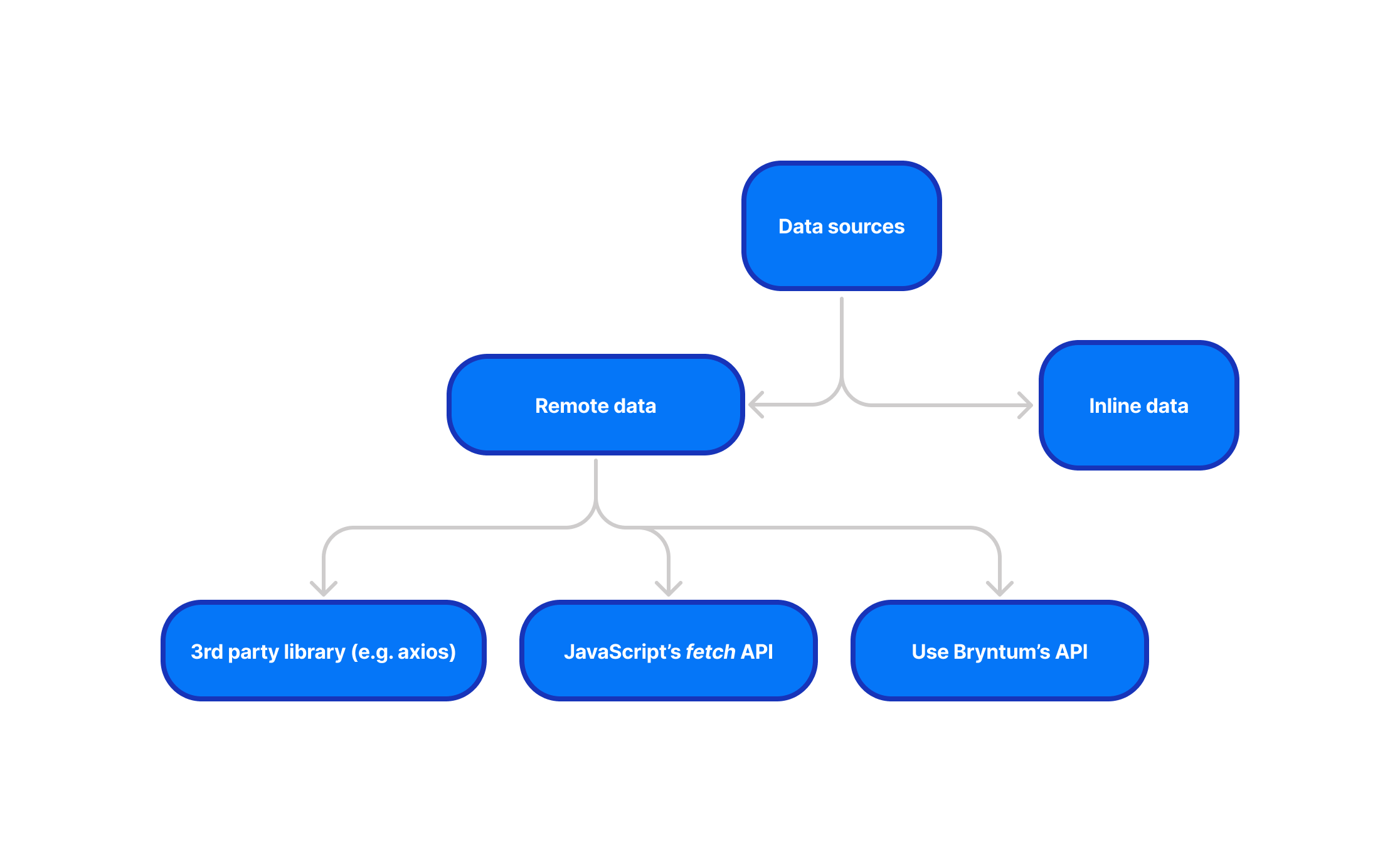
Let's start by exploring the two main sources of data:
- Inline data
- Remote data
Inline data
The easiest way to feed data into your Bryntum Grid is by using inline data. Just as HTML allows inline CSS,
you can include the data directly inside the new Grid({}) instance. Here's how to do it:
const grid = new Grid({
    columns : [/*...*/],
    data : [
        { id : 1, name : 'Batman' },
        { id : 2, name : 'Wolverine' },
        /*...*/
    ]
});
The above config results in the following Grid:
//<code-header>
fiddle.title = 'Basic grid setup';
//</code-header>
const grid = new Grid({
    appendTo : targetElement,

    autoHeight : true,

    columns : [
        {
            text   : 'Name',
            field  : 'name',
            flex   : 1,
            editor : {
                type     : 'textfield',
                required : true
            }
        }, {
            text  : 'Age',
            field : 'age',
            width : 100,
            type  : 'number'
        }, {
            text  : 'City',
            field : 'city',
            flex  : 1
        }, {
            text  : 'Food',
            field : 'food',
            flex  : 1
        }, {
            text     : 'Color',
            field    : 'color',
            width    : 80,
            type     : 'color',
            renderer : ({ cellElement, value }) => {
                cellElement.style.color = value;
                cellElement.style.fontWeight = '700';
                return value;
            }
        }
    ],

    data : [
        { id : 1, name : 'Don A Taylor', age : 30, city : 'Moscow', food : 'Salad', color : 'Black' },
        { id : 2, name : 'John B Adams', age : 65, city : 'Paris', food : 'Bolognese', color : 'Orange' },
        { id : 3, name : 'John Doe', age : 40, city : 'London', food : 'Fish and Chips', color : 'Blue' },
        { id : 4, name : 'Maria Garcia', age : 28, city : 'Madrid', food : 'Paella', color : 'Green' },
        { id : 5, name : 'Li Wei', age : 35, city : 'Beijing', food : 'Dumplings', color : 'Yellow' },
        { id : 6, name : 'Sara Johnson', age : 32, city : 'Sydney', food : 'Sushi', color : 'Purple' },
        { id : 7, name : 'Lucas Brown', age : 22, city : 'Toronto', food : 'Poutine', color : 'Orange' },
        { id : 8, name : 'Emma Wilson', age : 27, city : 'Paris', food : 'Croissant', color : 'Pink' },
        { id : 9, name : 'Ivan Petrov', age : 45, city : 'St. Petersburg', food : 'Borscht', color : 'Grey' },
        { id : 10, name : 'Zhang Ming', age : 50, city : 'Shanghai', food : 'Hot Pot', color : 'Purple' },
        { id : 11, name : 'Sophia Martinez', age : 20, city : 'Mexico City', food : 'Tacos', color : 'Crimson' },
        { id : 12, name : 'Noah Smith', age : 55, city : 'Cape Town', food : 'Biltong', color : 'Turquoise' },
        { id : 13, name : 'Isabella Jones', age : 33, city : 'Rio de Janeiro', food : 'Feijoada', color : 'Magenta' },
        { id : 14, name : 'Ethan Taylor', age : 29, city : 'Chicago', food : 'Deep-Dish Pizza', color : 'Cyan' },
        { id : 15, name : 'Olivia Brown', age : 37, city : 'Berlin', food : 'Schnitzel', color : 'Maroon' },
        { id : 16, name : 'Mia Wilson', age : 26, city : 'Rome', food : 'Pasta', color : 'Olive' },
        { id : 17, name : 'Jacob Miller', age : 60, city : 'Amsterdam', food : 'Stroopwafel', color : 'Lime' },
        { id : 18, name : 'Chloe Davis', age : 23, city : 'Los Angeles', food : 'Burger', color : 'Teal' },
        { id : 19, name : 'Aiden Martinez', age : 48, city : 'Buenos Aires', food : 'Asado', color : 'Violet' },
        { id : 20, name : 'Liam Lee', age : 38, city : 'Seoul', food : 'Kimchi', color : 'Indigo' },
        { id : 21, name : 'Sophie Kim', age : 21, city : 'Tokyo', food : 'Ramen', color : 'Pink' },
        { id : 22, name : 'Alexander Nguyen', age : 41, city : 'Hanoi', food : 'Pho', color : 'Coral' },
        { id : 23, name : 'Ella Patel', age : 19, city : 'Mumbai', food : 'Curry', color : 'Amber' },
        { id : 24, name : 'James O Connor', age : 34, city : 'Dublin', food : 'Irish Stew', color : 'Green' },
        { id : 25, name : 'Isabelle Chen', age : 31, city : 'Hong Kong', food : 'Dim Sum', color : 'Brown' }
    ]
});
Remote data
Remote data can come from a static .json file hosted on a web server (e.g., in the /public folder of your project
or on a CDN), or it can be retrieved dynamically from a server through an API call (e.g., data.php).
If you have a /data.php endpoint, you can access the data as follows:
new Grid({
    store : {
        autoLoad : true,
        readUrl  : 'data.json' // can be replaced with an API endpoint (e.g. read.php)
    }
})
The Store helps you manage your remote data. We'll talk more about it in the upcoming topic.
//<code-header>
fiddle.title = 'Remote data loading';
//</code-header>
const store = new AjaxStore({
    readUrl : './data.json'
});

const grid = new Grid({
    appendTo : targetElement,

    autoHeight : true,

    columns : [
        { field : 'name', text : 'Name', width : 200 },
        { field : 'city', text : 'City', flex : 1 },
        { field : 'age', text : 'Age', flex : 1 }
    ],

    store : {
        autoLoad : true,
        readUrl  : 'data/Grid/examples/guides/readme/data.json'
    }
});
You can also use axios or fetch API:
async function loadData() {
    const response = await fetch('backend/load.php');
    return await response.json();
}

// Extract data from loadData() via `await` or `.then`
// Assuming it has been saved to `data`

const grid = new Grid({
    store : {
        data: data
    }
})

// or

grid.store.data = data;
Working with remote data is more complex as it offers multiple ways of interaction. Let's move on to the next topic to learn more about how stores work.
Continue reading: Understanding the Store